HP Plotter Repair: Understanding the Most Common HP Plotter Failures
HP DesignJet plotters are the workhorses of engineering firms, architectural offices, and manufacturing facilities across the country. When these reliable machines start acting up, it can really throw a wrench in your daily operations. The good news is that understanding common failure patterns helps you catch problems early and know exactly when to call in the professionals for plotter repair.
.
Key Takeaways
- Paper feeding mechanisms are frequent troublemakers, usually due to worn rollers and drift issues
- Ink system blockages tend to be the priciest repair category for HP plotters
- Staying on top of preventive maintenance dramatically cuts down on surprise breakdowns
- When print quality starts declining, it's often a sign of multiple underlying problems
- Professional diagnostic equipment can spot issues that basic troubleshooting simply can't catch
- A good cleaning routine prevents most common plotter problems before they even start
Understanding HP Plotter System Components
Your HP DesignJet is actually a pretty sophisticated piece of equipment with several systems working together behind the scenes. Think of it like a well-orchestrated team where everyone needs to do their part perfectly.
The paper handling system includes all the components that guide your media through the printing process:
- Feed rollers - These grip and move your paper or media through the machine
- Pinch wheels - They apply just the right pressure to keep everything aligned
- Cutting assemblies - The precision components that give you those clean, straight cuts
The ink delivery system keeps everything flowing smoothly:
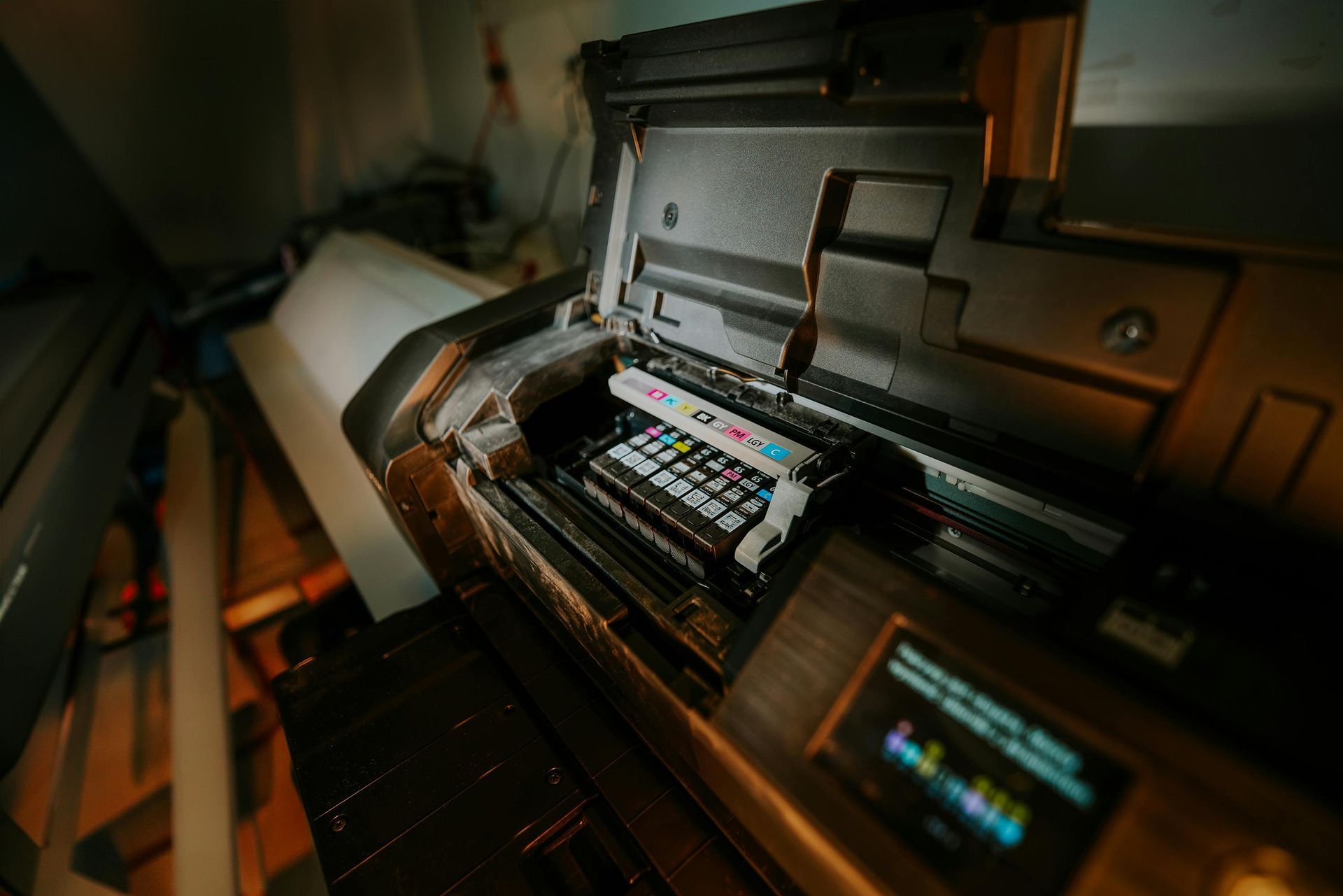
- Printheads - The precision nozzles that actually put ink on paper
- Ink cartridges - Your color supply that needs to stay fresh and flowing
- Internal tubing - The network that maintains consistent ink flow rates throughout the system
The electronic control systems are like the brain of the operation, managing print job processing, motor functions, and sensor feedback. These components chat with each other through complex firmware that keeps timing and positioning spot-on. When any single piece of this puzzle fails, you'll likely notice performance issues that affect both print quality and reliability.
Understanding these relationships really helps when troubleshooting. Professional repair technicians use specialized diagnostic equipment to test each subsystem independently, making sure they fix the real problem rather than just treating the symptoms.
Paper Feeding and Media Handling Problems
Let's face it: paper jams are probably the most annoying thing about any printing equipment, and they're definitely the most common reason people call for HP plotter repairs. These frustrating issues usually trace back to a few key culprits that develop over time.
Feed Roller Issues:
- Worn rubber surfaces - Over time, these rollers lose their grip and can't grab media properly
- Debris accumulation - Dust, paper fibers, and adhesive residue build up and reduce effectiveness
- Hardening with age - Rubber components naturally harden over time, especially in varying temperatures
Alignment Problems:
- Misaligned pinch wheels - Create uneven pressure that causes media to skew during printing
- Mechanical component shift - Parts gradually move from their original positions through normal use
- Environmental stress - Humidity and temperature changes can accelerate alignment issues
Sensor Troubles:
- Dirty detection sensors - Can't properly identify media sizes, leading to rejection of valid materials
- Calibration drift - Sensors gradually lose accuracy and need professional recalibration
- Size confusion - The plotter might try to print on incorrectly sized materials, wasting expensive media
Cutting mechanism failures deserve special attention because they can damage your expensive media and even create safety issues. Dull blades, misaligned guides, and motor problems all contribute to poor cutting performance that gets worse over time.
Ink System Failures and Print Quality Issues
Here's where things can get expensive quickly. Ink system problems often require the most technical expertise to fix properly, and they can really impact your productivity.
Printhead Problems:
- Nozzle clogs - Develop when ink dries inside those tiny openings, especially during periods of low use
- Environmental damage - Extreme temperatures or humidity can accelerate clog formation
- Poor quality ink - Non-genuine cartridges sometimes contain particles that block nozzles
Color and Flow Issues:
- Accuracy problems - Often indicate failing cartridges or contaminated ink lines that need professional cleaning
- Cross-contamination - When different ink colors mix in the lines, creating muddy or incorrect colors
- Flow irregularities - Can signal internal leaks or faulty monitoring systems that waste expensive ink
Print Pattern Problems:
- Streaking and banding - Usually suggest uneven ink distribution or mechanical timing issues
- Missing colors - Often the first sign of printhead clogs that need immediate attention
- Excessive consumption - May indicate serious internal leaks that require immediate professional service
| Common Ink System Problems | Typical Symptoms | Professional Solution Required |
|---|---|---|
| Printhead Clogs | Missing colors, white lines | Yes - Specialized cleaning equipment |
| Cartridge Failures | Color shifts, low ink alerts | Sometimes - May need calibration |
| Line Contamination | Color bleeding, mixed outputs | Yes - System flush procedures |
| Leak Detection | Ink stains, excessive consumption | Yes - Internal component replacement |
Electronic and Control System Malfunctions
The electronic side of your HP plotter is pretty sophisticated, but that also means more things can occasionally go wrong. The good news is that many of these issues are preventable with proper care.
Software and Firmware Challenges:
- Corruption issues - Can cause erratic, unpredictable behavior that seems random
- Power surge damage - Sudden electrical spikes can scramble the plotter's programming
- Failed updates - Sometimes, firmware updates don't install correctly and need professional restoration
Communication Problems:
- Interface issues - Problems between your plotter and connected computers can interrupt large jobs
- Network connectivity - Wi-Fi or ethernet problems can waste time and expensive materials
- Driver conflicts - Outdated or corrupted drivers often cause mysterious printing problems
Calibration and Sensor Issues:
- Positioning drift - Affects print accuracy and media handling precision over time
- Gradual changes - These shifts often go unnoticed until print quality becomes obviously poor
- Professional equipment needs - Proper calibration requires manufacturer-specific tools and procedures
Motor control problems can manifest as mechanical noise, irregular movement, or complete positioning failures. These issues often require both component replacement and precise adjustment procedures that really need specialized training and tools to get right.
Mechanical Wear and Component Degradation
Like any hardworking machine, your HP plotter experiences normal wear and tear that eventually needs attention. The key is catching these issues before they cause bigger problems.
Timing and Movement Systems:
- Belt stretching - Affects print positioning accuracy as components lose their precise timing
- Pulley wear - Can cause irregular movement that shows up as print quality problems
- Replacement scheduling - Professional service hp plotter technicians can spot wear patterns before they cause issues
Motor and Bearing Components:
- Noise development - Often the first sign that bearings are starting to wear out
- Vibration increases - Can damage other components if not addressed promptly
- Early detection benefits - Professional inspection helps prevent expensive cascading failures
Electrical and Connection Issues:
- Loose connections - Develop over time due to thermal cycling and mechanical stress
- Intermittent problems - Often trace back to poor connections that require professional diagnosis
- Hidden locations - Many connection points are internal and need professional access to inspect properly
Proper lubrication is more complex than you might think. Different parts of your plotter need different types of lubricants applied at specific intervals. Professional HP plotter services include comprehensive lubrication schedules that keep everything running smoothly and extend component life significantly.
Environmental Factors Affecting HP Plotter Performance
Your HP plotter's environment plays a bigger role in its health than many people realize. Creating the right conditions can prevent a lot of common problems from developing in the first place.
Temperature Considerations:
- Ink viscosity changes - Extreme temperatures affect how smoothly ink flows through the system
- Mechanical tolerance shifts - Components expand and contract, affecting precision over time
- Gradual damage - Temperature extremes can cause premature component failure that's hard to predict
Humidity Management:
- Paper handling effects - Too much moisture causes curling, while too little creates static problems
- Ink flow characteristics - Humidity levels influence how ink behaves during the printing process
- Professional assessment - Many Hewlett-Packard plotter repair services include environmental evaluation and recommendations
Cleanliness and Power Quality:
- Dust accumulation - Affects sensors, mechanical components, and overall print quality
- Regular maintenance needs - Professional deep cleaning addresses areas that basic user cleaning can't reach
- Electrical protection - Power fluctuations and electrical noise can damage sensitive components over time
Preventive Maintenance Strategies
Here's where you can really make a difference in your plotter's longevity and reliability. A good preventive maintenance approach saves money and headaches down the road.
Professional Cleaning Services:
- Deep internal cleaning - Goes beyond what users can safely access with specialized tools and procedures
- Component-specific care - Different parts need different cleaning methods and solutions
- Schedule optimization - Professional services help determine the right frequency based on your usage patterns
Component Life Cycle Management:
- Usage-based replacement - Track component life cycles and replace parts before they fail
- Proactive scheduling - Professional service providers recommend replacement timing based on real-world experience
- Cost-effective planning - Prevents emergency repairs that often cost more than scheduled maintenance
System Optimization:
- Calibration verification - Ensures consistent print quality and proper system operation over time
- Performance monitoring - Professional diagnostic equipment detects problems before they affect output
- Environmental recommendations - Helps create optimal operating conditions that prevent premature wear
Frequently Asked Questions
How often should my HP plotter get professional maintenance?
Most HP plotters benefit from professional service every six to twelve months, depending on how heavily you use them. If you're running high-volume operations, quarterly visits often make more sense to catch problems before they cause downtime.
What warning signs mean I need to call a professional right away?
Don't wait if you're seeing consistent print quality problems, hearing unusual noises, getting error messages that won't clear, or experiencing any mechanical binding or jamming. Quick professional attention usually prevents more expensive damage.
What kind of maintenance can I safely do myself?
You can definitely handle basic external cleaning, proper ink cartridge replacement, and making sure media loads correctly. However, anything involving internal cleaning, calibration, or component adjustment really should be left to trained professionals with the right tools.
How long do professional HP plotter repairs usually take?
Simple issues might be fixed in just a few hours, while complex problems involving multiple systems can take several days, especially if parts need to be ordered. Good service providers will give you a realistic timeline after they've diagnosed the problem.
Should I repair my older HP plotter or just replace it?
That's a great question that depends on your specific model, its current condition, parts availability, and what a replacement would cost. Professional technicians can give you an honest cost-benefit analysis to help you make the smartest financial decision.
Final Thoughts
Taking care of your printers through regular professional service makes good business sense. You'll save money, avoid frustrating breakdowns, and keep your office running smoothly. The key is finding a reliable service provider who understands your business needs and can keep your equipment performing at its best. When you think about how much your business depends on printing for daily operations, investing in proper maintenance is one of the smartest decisions you can make for long-term success and peace of mind. Regular servicing of printers isn't just an expense; it's an investment in your business's productivity and professional image.
Don't let plotter problems slow down your operations. Professional diagnostic services can identify issues quickly and get you back to producing quality prints. Contact our experienced HP plotter repair specialists today for expert service that keeps your equipment running smoothly.
Reference:
https://support.hp.com/si-en/document/bpp02272
Share this article